Archive for the ‘Servidores y aplicaciones web’ Category

h1

Failed to start guacd.service: Unit guacd.service is masked.

16/04/2019

Si al configurar Apache Guacamole sucede el siguiente error:

root@rock64:/var/lib/tomcat8/webapps/guacamole-1.0.0# service guacd start
Failed to start guacd.service: Unit guacd.service is masked.

Se soluciona eliminando la anulación o enmascaramiento:

root@rock64:/var/lib/tomcat8/webapps/guacamole-1.0.0# systemctl unmask guacd.service
Removed /etc/systemd/system/guacd.service.


h1

Subsonic, ERROR DaoHelper – Failed to initialize database.

26/01/2015

Cuando ocurre un error del servidor web «jetty» de Subsonic ó Madsonic, y tras comprobar el log:

root@shirley:/var/subsonic# cat /var/subsonic/subsonic.log

Si se produce este error:

[2015-01-26 14:38:57,352] INFO DaoHelper - Checking database schema.
[2015-01-26 14:38:59,489] ERROR DaoHelper - Failed to initialize database.
org.springframework.jdbc.CannotGetJdbcConnectionException: Could not get JDBC Connection; nested exception is java.sql.SQLException: error in script file line: 62 S1000 General error java.lang.NullPointerException in statement [SET TABLE SHARE INDEX'9290275 9290275 9290275 9290275 1']
        at org.springframework.jdbc.datasource.DataSourceUtils.getConnection(DataSourceUtils.java:82)
        at org.springframework.jdbc.core.JdbcTemplate.execute(JdbcTemplate.java:382)
        at org.springframework.jdbc.core.JdbcTemplate.execute(JdbcTemplate.java:429)
        at net.sourceforge.subsonic.dao.schema.Schema25.execute(Schema25.java:38)
        at net.sourceforge.subsonic.dao.DaoHelper.checkDatabase(DaoHelper.java:115)
        at net.sourceforge.subsonic.dao.DaoHelper.<init>(DaoHelper.java:72)
        at sun.reflect.NativeConstructorAccessorImpl.newInstance0(Native Method)
        at sun.reflect.NativeConstructorAccessorImpl.newInstance(NativeConstructorAccessorImpl.java:57)
        at sun.reflect.DelegatingConstructorAccessorImpl.newInstance(DelegatingConstructorAccessorImpl.java:45)
        at java.lang.reflect.Constructor.newInstance(Constructor.java:526)
        at org.springframework.beans.BeanUtils.instantiateClass(BeanUtils.java:100)
        at org.springframework.beans.factory.support.SimpleInstantiationStrategy.instantiate(SimpleInstantiationStrategy.java:61)
        at org.springframework.beans.factory.support.AbstractAutowireCapableBeanFactory.instantiateBean(AbstractAutowireCapableBeanFactory.java:877)
        at org.springframework.beans.factory.support.AbstractAutowireCapableBeanFactory.createBeanInstance(AbstractAutowireCapableBeanFactory.java:839)

es debido a que la base de datos está corrupta. Para solucionar, es necesario restaurar un backup:

carlos@shirley:~# cd /var/subsonic/db/
root@shirley:/var/subsonic/db# cp subsonic.backup subsonic.data

y rearrancar Subsonic:

carlos@shirley:/var/subsonic/db# /etc/init.d/subsonic restart
* Restarting Subsonic Daemon subsonic Started Subsonic [PID 4093, /var/subsonic/subsonic_sh.log]

h1

Pydio, MCrypt is required by all security functions

04/01/2015


Si al instalar Pydio, sucede este mensaje de error en la web de instalación:

MCrypt enabled ERROR
MCrypt is required by all security functions.

Se soluciona activando el módulo de Mcrypt y reiniciando Apache:

carlos@shirley:/etc/php5/mods-available$ sudo php5enmod mcrypt
carlos@shirley:/etc/php5/mods-available$ sudo /etc/init.d/apache2 restart
AH00558: apache2: Could not reliably determine the server's fully qualified domain name, using 127.0.1.1. Set the 'ServerName' directive globally to suppress this message
* Restarting web server apache2

h1

ERROR: Site pydio does not exist!

04/01/2015

Si ocurre el siguiente error:

carlos@shirley:~/downloads$ sudo a2ensite pydio
ERROR: Site pydio does not exist!

renombrar el fichero «pydio» por «pydio.conf» y repetir:

carlos@shirley:~/downloads$ mv pydio pydio.conf
carlos@shirley:/etc/apache2/sites-available$ a2ensite pydio
Enabling site pydio.
carlos@shirley:/etc/apache2/sites-available$ sudo /etc/init.d/apache2 restart
AH00558: apache2: Could not reliably determine the server's fully qualified domain name, using 127.0.1.1. Set the 'ServerName' directive globally to suppress this message
* Restarting web server apache2

h1

Joomla error 500 276

20/03/2014

Se se obtiene en Joomla el siguiente error:


joomla error 500 276

Revisar los permisos del sitio. Como primera aproximación, siempre para descartar problemas de permisos, dar permisos totales a la carpeta:

$ chmod -R 777 /var/www/myJoomlaSite

Tanto si el sitio funciona como si no, restaurar los permisos al estado habitual de Joomla (755 para directorios, 644 para ficheros):


$ find . -type d -exec chmod 755 {} \;
$ find . -type f -exec chmod 644 {} \;

h1

Joomla, The requested URL /es/ was not found on this server.

20/03/2014

Si se obtiene un error de este tipo al acceder a un site montado con Joomla:

Joomla

Not Found

The requested URL /es/ was not found on this server.


Apache/2.2.20 (Ubuntu) Server at 172.26.0.10 Port 80

probablemente sea debido a la ausencia del fichero .htaccess. Para ello, en la propia raíz del sitio, donde se encuentra el fichero «htaccess.txt», copiarlo como «.htaccess».

h1

Cómo albergar varios dominios en una misma cuenta de hosting

19/11/2013

Si se desea tener diversos dominios en una misma cuenta de hosting, es necesario a parte de tener configuradas las DNS adecuadamente, tener en la raíz del hosting si utiliza Apache la siguiente configuración en el fichero «.htaccess» 


 # .htaccess main domain to subdirectory redirect
        # Copy and paste the following code into the .htaccess file
        # in the public_html folder of your hosting account
        # make the changes to the file according to the instructions.
        # Do not change this line.
        RewriteEngine on

# INICIO DOMINIO1 # Change example.com to be your main domain. RewriteCond %{HTTP_HOST} ^(www.)?example.com$ # Change 'subdirectory' to be the directory you will use for your main domain. RewriteCond %{REQUEST_URI} !^/subdirectory/ # Don't change these line. RewriteCond %{REQUEST_FILENAME} !-f RewriteCond %{REQUEST_FILENAME} !-d # Change 'subdirectory' to be the directory you will use for your main domain. RewriteRule ^(.*)$ /subdirectory/$1 # Change example.com to be your main domain again. # Change 'subdirectory' to be the directory you will use for your main domain # followed by / then the main file for your site, index.php, index.html, etc. RewriteCond %{HTTP_HOST} ^(www.)?example.com$ RewriteRule ^(/)?$ subdirectory/index.html [L]
#FIN DOMINIO 1
#INICIO DOMINIO 2
(...)

Reemplazando «example.com» por el dominio en cuestión y «subdirectory» por el subdirectorio que lo albergará. Repetir el bloque de directivas por cada dominio.


Fuente: https://my.hostmonster.com/cgi/help/347

h1

Joomla, an error occurred while processing this directive, SHTML Wrapper 500 Server Error

26/12/2012

Si al instalar un sitio con Joomla, se produce este error:

[an error occurred while processing this directive]
SHTML Wrapper - 500 Server Error

es necesario activar la extensión FastCGI de PHP. Si se dispone de un host ajeno (Hostmonster, Dreamspace, etc), se puede hacer accediendo al panel de control o contactando con el departamento de soporte.

PHP 5.2 (FastCGI)
All files with the extension .php will be handled by PHP 5.2 FastCGI processes.
FastCGI for PHP makes all your PHP applications run through mod_fastcgi instead of mod_suphp. This eliminates the overhead of loading the PHP interpreter on every hit. Since it is always in memory ready for the next hit, the responses will be generated faster.
h1

Subsonic HTTP ERROR 503, SERVICE_UNAVAILABLE

05/10/2012

Si al utilizar la aplicación web Subsonic ocurre el siguiente error en el navegador:

HTTP ERROR: 503

SERVICE_UNAVAILABLE
RequestURI=/

Powered by jetty://

se soluciona, aunque algo drasticamente, eliminando la base de datos antigua. Para ello, realizar los siguientes pasos:

$ /etc/init.d/subsonic stop
$ sudo mv /var/subsonic/db /var/subsonic/db_ANTIGUA
$ /etc/init.d/subsonic start

Recordar que esto borrará los usuarios creados, por lo que será necesario crearlos de nuevo.

h1

Jomres error exchangerates_GBP.class.php

12/05/2012

Si configurando el software de reservas Jomres se produce el siguiente error:

Fatal error: require_once(): Failed opening required '/var/www/booking_desarrollo2/jomres/temp/exchangerates_GBP.class.php' (include_path='.:/usr/share/php:/usr/share/pear') in /var/www/booking_desarrollo2/jomres/libraries/jomres/classes/jomres_currency_exchange_rates.class.php on line 67

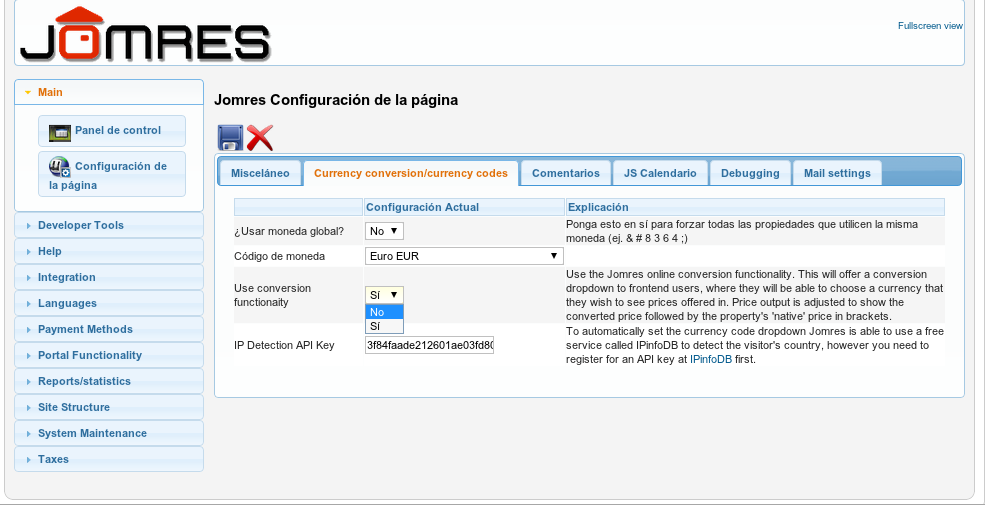
se soluciona entrando en
Panel de Control > Configuración de la página

cambiando el valor:
"Use conversion funcionality" de Si a No